

This guide will help you learn how to Restrict Certain Dinosaurs on your Path of Titans Server
Click here to order your Path of Titans server with Citadel Servers today!
Controlling which dinosaurs are available to players is an important part of managing your Path of Titans server. Whether you're running a realism-focused community, organizing a competitive environment, or simply looking to create a more balanced gameplay experience, restricting certain dinosaurs allows you to customize the available roster to better suit your server's rules and preferences. By configuring dinosaur restrictions, you can determine which species players are allowed to select and prevent access to dinosaurs that may not fit your server's intended gameplay style. For example, you may want to disable particularly powerful dinosaurs to maintain a balanced playing field, restrict certain species to encourage players to explore different playstyles, or limit the available roster to match a specific theme or roleplay environment. These adjustments can also help server administrators establish community-specific rules, ensuring that all players follow the same dinosaur availability requirements. Path of Titans provides configuration options that allow server owners to manage dinosaur availability without necessarily having to modify the entire server setup. By adjusting the appropriate settings, you can restrict selected dinosaurs while keeping the rest of the available species accessible to your community. In this guide, we'll walk you through how to access your Path of Titans server configuration files and configure the appropriate dinosaur restrictions. We'll also explain how to adjust these settings to prevent players from selecting specific dinosaurs and tailor the available species to your preferred server experience.
Disabling Certain Dinosaurs on Your Path of Titans Server
1. Log in to your Game Control Panel.
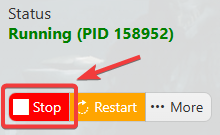
2. Before making any modifications, stop the server from running by clicking the Stop button.
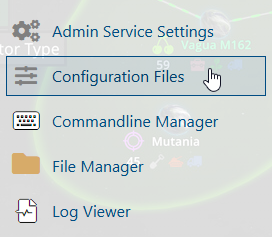
3. Navigate to Configuration Files.
4. In the Configuration Files section, locate the Game.ini file and click Text Editor to open and edit the file.

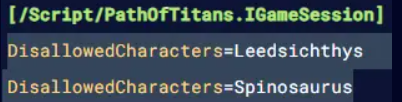
5. In the configuration file, add the DisallowedCharacters=<Name> parameter under the [/Script/PathOfTitans.IGameSession] header to disable a specific dinosaur on your server.
| Command | Description |
AllowedCharacters=<Name> |
Creates an allowlist of dinosaurs. Dinosaurs not listed in the Allowed Characters are banned. |
DisallowedCharacters=<Name> |
Sets a blocklist of dinosaurs. Dinosaurs not listed in the Disallowed Characters are playable. |
6. After editing, click the Save button to apply the changes.

