
This guide will help you How to Change the Death Penalty on your Path of Titans Server
Click here to order your Path of Titans server with Citadel Servers today!
In Path of Titans, the death penalty system determines how much progress players lose when their dinosaurs die. Depending on your server's configuration, players may lose a percentage of their accumulated growth and Marks after dying from combat, fall damage, or survival-related causes such as starvation, dehydration, and drowning. These penalties add consequences to player deaths and encourage more careful gameplay, making them an important part of your server's overall difficulty and survival experience. As a server administrator, you can customize these penalties to create a gameplay experience that better matches your community's preferences. For example, servers designed for casual gameplay may benefit from reduced death penalties, allowing players to recover more easily without losing significant progress. On the other hand, realism, hardcore, or competitive servers may benefit from higher penalties that make survival more challenging and encourage players to think carefully before engaging in dangerous encounters. Path of Titans provides separate configuration parameters for controlling growth and Marks penalties based on the cause of death. This means you can independently adjust the consequences of combat deaths, fall-related deaths, and survival-related deaths. You can also configure the minimum growth a player retains after dying and determine whether players can lose growth beyond their current growth stage. This flexibility allows you to fine-tune the death penalty system without having to apply the same punishment to every type of death. In this guide, we will walk you through the process of changing the death penalty settings on your Path of Titans server using the Citadel Servers Game Panel. We will cover how to access the Game.ini configuration file, locate the appropriate death penalty parameters, and adjust their values according to your preferred gameplay experience. Whether you want to reduce growth loss, minimize Marks deductions, or introduce harsher survival consequences, these settings will help you customize how death affects players on your server. Before making any changes, we recommend stopping your server and creating a backup of your existing configuration file. Make sure the death penalty parameters are placed under the correct [/Script/PathOfTitans.IGameSession] section, with each setting entered on a separate line. Once you have finished editing, save the file and restart your server to apply the changes.
Managing Death Penalty Settings
1. Log in to your Game Control Panel.
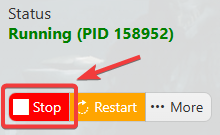
2. Before making any modifications, stop the server from running by clicking the Stop button.
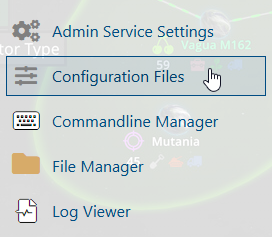
3. Navigate to Configuration Files.
4. In the Configuration Files section, locate the Game.ini file and click Text Editor to open and edit the file.

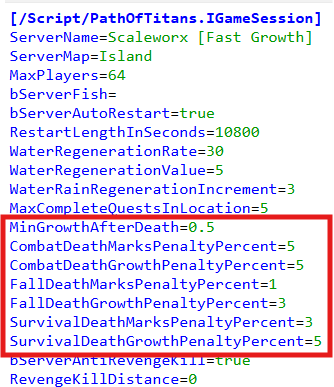
5. In the configuration file, locate the Death Penalties parameters listed below.
Adjust the values of these parameters according to your preferred death penalty settings to customize the penalties players receive when their dinosaurs die on your server.
(Note: If these parameters are not present in the configuration file, you can manually add them under the [/Script/PathOfTitans.IGameMode] section.)
6. After editing, click the Save button to apply the changes.

