

This guide will help you configure the Length of Day and Night on your Path of Titans Server
Click here to order your Path of Titans server with Citadel Servers today!
Path of Titans features a dynamic day and night cycle that affects the atmosphere and overall gameplay experience across your server. Depending on your community's preferences, you may want longer daylight hours for players who enjoy exploring, hunting, gathering resources, and interacting with other dinosaurs in well-lit environments. Alternatively, you might prefer shorter days and longer nights to create a more challenging and immersive survival experience. Adjusting the day and night duration allows you to customize these environmental conditions to better suit your server's playstyle and community expectations. As a server administrator, having control over the day and night cycle can help you create a more enjoyable and balanced multiplayer environment. For example, servers focused on casual gameplay may benefit from extended daytime periods, giving players more opportunities to explore the map and participate in activities without frequently encountering darkness. On the other hand, communities looking for a more realistic or challenging experience may prefer longer nighttime periods to introduce additional atmosphere and variety into their gameplay sessions. The day and night cycle in Path of Titans can be customized through your server's configuration file, allowing you to specify how long each period lasts in real-world minutes. By adjusting the ServerDayLength and ServerNightLength parameters, you can independently control the duration of daytime and nighttime. For instance, you can configure a longer daytime period while keeping nighttime relatively short, or set both durations equally for a more balanced cycle. In this guide, we will walk you through the process of changing the day and night duration on your Path of Titans server using the Citadel Servers Game Panel. We will explain where to find the Game.ini configuration file, which parameters you need to modify, and how to assign your preferred durations. Whether you want to create longer daylight hours, extend nighttime for a more immersive survival experience, or establish a balanced day/night schedule, following these steps will help you customize the cycle to match your server's requirements. Before making any changes, we recommend stopping your server and creating a backup of your existing configuration file. This helps prevent configuration conflicts and ensures you can restore your previous settings if needed. Also, make sure the day and night parameters are placed under the correct [/Script/PathOfTitans.IGameMode] section, as settings placed under the wrong section may not work as intended
Setting Custom Day and Night Lengths
1. Log in to your Game Control Panel.
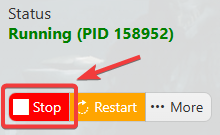
2. Before making any modifications, stop the server from running by clicking the Stop button.
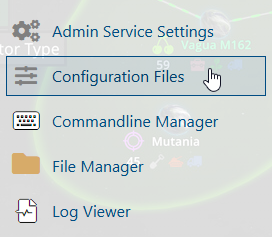
3. Navigate to Configuration Files.
4. In the Configuration Files section, locate the Game.ini file and click Text Editor to open and edit the file.

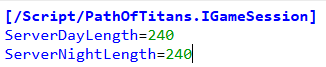
5. In the configuration file, locate the ServerDayLength and ServerNightLength parameters.
Adjust their values according to your preferred daytime and nighttime durations to customize the day/night cycle on your server.
(Note: If these parameters are not present in the configuration file, you can manually add ServerDayLength and ServerNightLength under the [/Script/PathOfTitans.IGameMode] section.)
6. After editing, click the Save button to apply the changes.

