

This guide will show you how to Adjust Loot Respawn Settings on a Project Zomboid Server
Click here to order your Project Zomboid server with Citadel today!
Loot respawn is an important gameplay setting in Project Zomboid that allows you to control how frequently items reappear in containers throughout the game world. Adjusting these settings can help you manage resource availability, maintain long-term survival challenges, and create a balanced multiplayer experience for your players. Whether you want to ensure that essential supplies remain available for your community or make scavenging more challenging by limiting access to resources, customizing loot respawn settings allows you to tailor your server to your preferred gameplay style. By default, loot availability depends on your server's configuration and the specific loot respawn rules applied to the game world. You can customize these settings to set how many in-game days must pass before loot respawns, how often the game checks eligible containers, and whether to exclude certain areas from loot respawning. These options are particularly useful for long-running multiplayer servers where players regularly explore buildings, search abandoned locations, and consume valuable supplies. In this guide, we will walk you through the process of adjusting loot respawn settings on your Project Zomboid server by accessing the appropriate server configuration file and modifying the relevant parameters. You will learn how to configure the loot respawn interval and related settings to better suit your server's needs. Before making any changes, we recommend stopping your server and creating a backup of your existing configuration file to help prevent unintended changes or configuration issues. Once you have updated the settings, save the configuration file and restart your server for the changes to take effect. Keep in mind that loot respawning may also depend on other gameplay conditions, such as whether a container has been visited or whether a region meets the game's respawn requirements. Understanding these factors will help you configure your server more effectively and provide a consistent, enjoyable survival experience for everyone.
Configuring Loot Respawn
1. Log in to your Game Control Panel.
2. Before making any modifications, stop the server from running by clicking the Stop button.

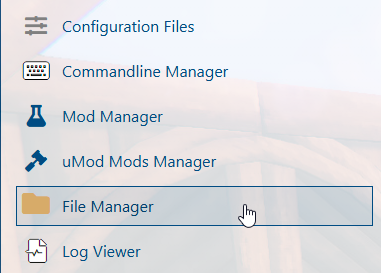
3. Navigate to the File Manager section.
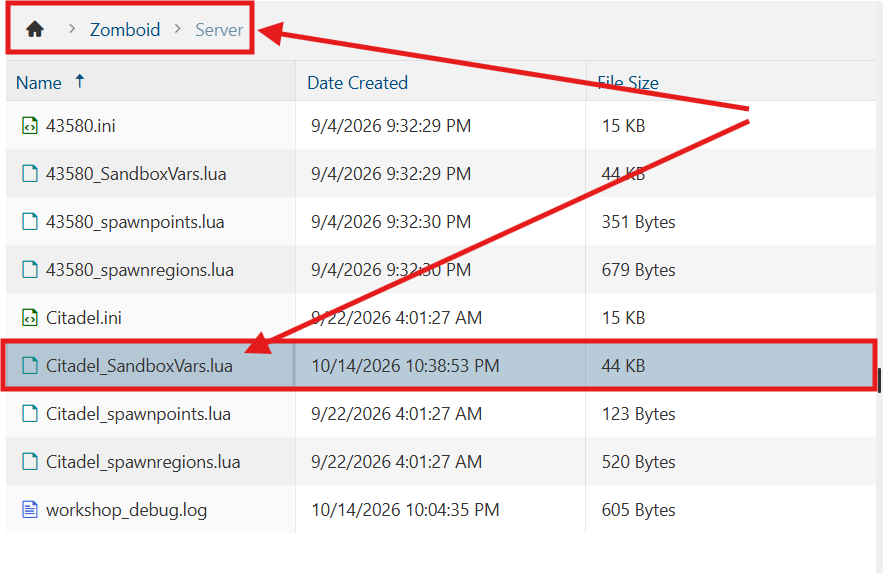
4. Navigate to the /Zomboid/Server directory and locate the [SaveName]_SandboxVars.lua file, replacing [SaveName] with the name of your server's save.
5. In the configuration file, locate the Loot Respawn settings and adjust the values according to your preferred gameplay experience.

| Setting | Description |
|---|---|
HoursForLootRespawn= |
When greater than 0, loot will respawn after X in-game hours. A container must be looted at least once for it to respawn. |
MaxItemsForLootRespawn= |
Containers with X items remaining become eligible for respawn rules. |
SeenHoursPreventLootRespawn= |
When greater than 0, loot will not respawn in zones that have been visited within X in-game hours. |
ConstructionPreventsLootRespawn= |
Sets whether items respawn in buildings with player-built barricades or structures. |
6. After editing, click Save to apply the changes.

You can now start playing on your server.
Did the above information not work for you?
Please click here to contact our support via a ticket.