

This guide will show you how to install DXRP to your S&Box server.
1. Login to your Game Control Panel.
2. Go to Commandline Manager.
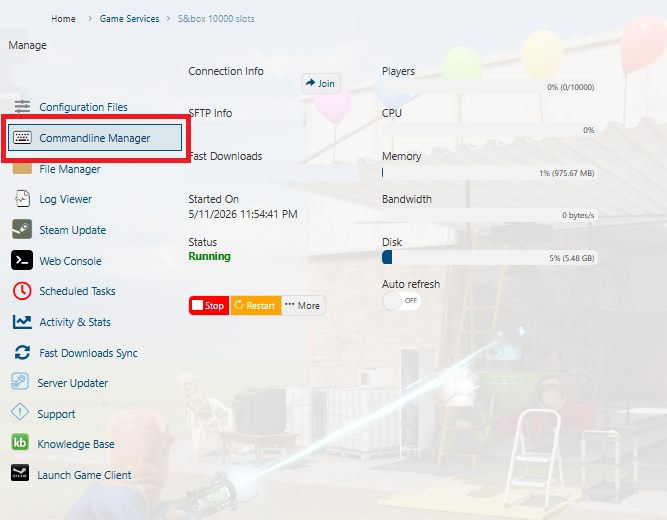
3. Click Modify on the Custom Gamemodes commandline to edit it.
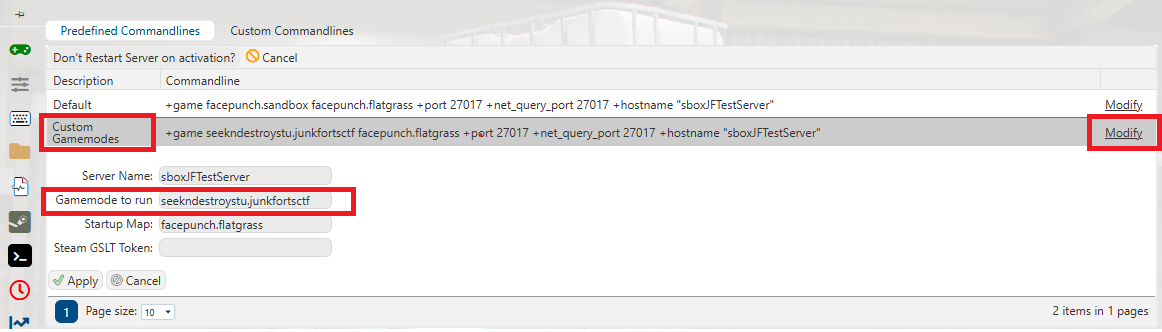
4. Set the Game Mode to Run to
5. Restart your server.
dxura.rp and then click Save.5. Restart your server.
The first startup may take several minutes because: maps, assets, models, sounds, package dependencies, must download.
Do not restart repeatedly during the first installation.
6. Join your server.
7. To change your S&box gamemode, get its identifier from the official S&box site: https://sbox.game/
Go to the gamemode page in your browser and copy the URL after
sbox.game/.
Did the above information not work for you?
Please click here to contact our support via a ticket.