

This guide will help you How to Adjust the Difficulty Level on your Craftopia Server
Looking for a Craftopia server? Click here to order your Craftopia server today!
Choosing the right difficulty level for your Craftopia server can significantly influence how players experience the game, from exploring the world and gathering resources to battling enemies and surviving challenging encounters. Whether you're hosting a casual server focused on exploration and building or a more challenging multiplayer experience for experienced players, adjusting the difficulty allows you to tailor the gameplay to your community's preferences. Craftopia provides several difficulty options, allowing server administrators to choose between more relaxed gameplay and increasingly demanding encounters. These settings can be configured directly through the server's ServerSetting.ini file by modifying the difficulty value under the [GameWorld] section. The available difficulty levels range from Easy to Very Hard, with Normal serving as the default setting. In this guide, we'll walk you through accessing your Craftopia server's configuration file and changing its difficulty level. We'll also explain the available difficulty values so you can select the option that best suits your players' preferred gameplay experience.
Important: Make sure to stop your server before modifying its configuration files. Save your changes and restart the server afterward to apply the updated settings. Also, keep in mind that difficulty is a world setting, so changing it may require generating a new world for the adjustment to take effect. Back up your existing world before making changes.
Setting the Difficulty Level on Your Craftopia Server
1. Log in to your Game Control Panel and navigate to your service.
2. Before making changes, make sure the server is stopped.
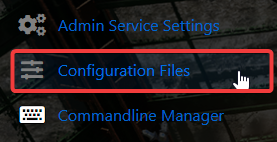
3. Navigate to Configuration Files.
4. In the Configuration Files, click the serversettings.ini file and click the Text Editor.

5. In the Text Editor, locate the difficulty line and change its value to your preferred difficulty level.

| Difficulty | Description |
| Easy Value = 1 |
For those who wish to play the game with ease and minimal frustration. |
| Normal (Default) Value = 2 |
For those looking to explore and enjoy life in a different world. |
| Hard Value = 3 |
For those looking to have fun fighting enemies in intense combats. |
| Very Hard Value = 4 |
For expert players, only the strongest can survive. |
| Hell Value = 5 |
"Even hell won't suffice for you!!" |
6. After editing, click the Save button to apply the changes.

Need further assistance?
Please click here to contact support via a ticket.
