
This guide will show you how to Edit Player Settings on your Enshrouded Server
Not a client yet? Order an Enshrouded Server today with Citadel Servers
Player settings play an important role in shaping the overall gameplay experience on your Enshrouded server. Whether you want to create a more challenging survival environment, make progression more accessible, or provide a balanced experience for everyone, adjusting player-related configuration options allows you to customize how players interact with the game world. These settings can influence various aspects of gameplay, including player progression, combat difficulty, survival mechanics, and other character-related features, depending on the configuration options supported by your server. Customizing these settings is particularly useful when hosting a private server for friends, managing a community server, or creating a specific gameplay experience for your players. For example, you may want to make certain gameplay elements more forgiving for casual players or increase the difficulty to provide a greater challenge for experienced adventurers. By modifying the available player settings, you can tailor the server environment to better suit your community's preferences without necessarily having to start a new world. In this guide, we will walk you through the process of editing player settings on your Enshrouded server using the Citadel Servers Game Panel. You will learn how to locate the appropriate configuration file, identify the available player-related parameters, and adjust their values according to your preferred gameplay experience. These options include modifying player health, mana, stamina, body heat, and diving time, as well as configuring other survival-related mechanics that affect how players progress and explore the world. Before making any changes, it is recommended to stop your server and create a backup of your existing configuration file. This helps prevent accidental data loss and allows you to restore your previous settings if something does not work as expected. Keep in mind that Enshrouded uses a JSON configuration file, so maintaining the correct formatting, quotation marks, commas, and brackets is essential. Once you have finished editing and saving your configuration, you can restart your server to apply the changes. With the right configuration, you can create a more enjoyable and balanced multiplayer experience that accommodates different playstyles and preferences. Whether you are aiming for a relaxed adventure or a more demanding survival experience, understanding these settings will give you greater control over how players experience your Enshrouded world.
(Note: Make sure your server's gameSettingsPreset is set to "Custom" when manually configuring individual gameplay options, otherwise, the selected preset may override those values.)
Adjusting Player-Related Server Settings
1. Log in to your Game Panel and navigate to your service.
2. Before making any modifications, stop the server from running by clicking the Stop button.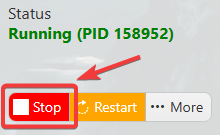
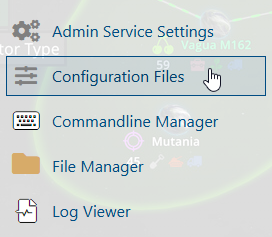
3. Navigate to the Configuration Files section.
4. Open the Text Editor and locate the Player Settings. Modify its value according to your preferred player settings to customize the gameplay experience on your server.
(Note: Values are expressed as percentages in the game.)
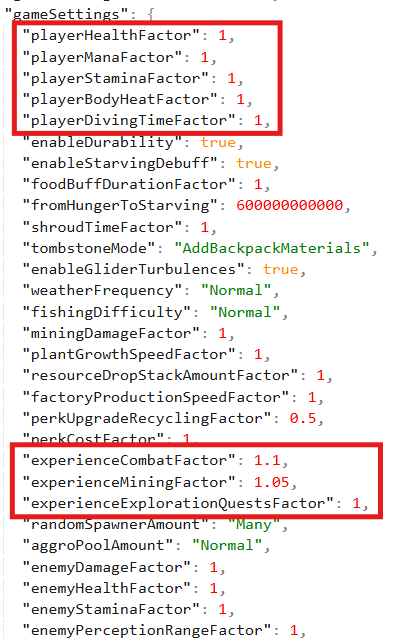
| Setting Values | Normal | Relaxed | Hard | Survival |
Player Health Factor (0.25-4) |
1 |
2 |
1 |
0.75 |
Player Mana Factor (0.25-4) |
1 |
2 |
1 |
1 |
Player Body Heat Factor (0.5-2) |
1 |
2 |
1 |
0.75 |
Player Stamina Factor (0.25-4) |
1 |
2 |
1 |
1 |
Player Diving Time Factor (0.75-2) |
1 |
1.5 |
0.9 |
0.75 |
Mining Experience Multiplier (0-2) |
1 |
1.25 |
0.5 |
0.5 |
Exploration Experience Multiplier (0.25-2) |
1 |
1 |
1 |
1 |
Combat Experience Multiplier (0.25-2) |
1 |
1.2 |
0.5 |
0.5 |
5. After editing, click the Save button to apply the changes.

Did the above information not work for you?
Please click here to contact our support via a ticket.
