

This guide will help you How to Perform a Clean Reinstallation of your DeadPoly Server
Click here to order your DeadPoly server from Citadel today!
Performing a clean reinstallation of your DeadPoly server is a useful troubleshooting step when you encounter persistent server issues, corrupted or missing game files, startup errors, or problems that cannot be resolved through standard troubleshooting methods. Reinstalling your server replaces its existing game installation files with fresh copies, helping ensure that the server is running the required files for DeadPoly and providing a clean starting point for further configuration. Before proceeding with the reinstallation, it is important to understand that this process may affect your existing server files, configurations, saved world data, and other customized settings, depending on how the reinstallation is performed and how your hosting provider handles server files. To avoid losing important data, we strongly recommend creating a backup of your server files, especially your save data, configuration files, and any custom settings you wish to preserve. You should also make a note of your current server configuration so you can restore your preferred settings after the reinstallation is complete. In this guide, we will walk you through the process of performing a clean reinstallation of your DeadPoly server through your game server control panel. By following these instructions, you can replace the existing game installation, establish a fresh installation environment, and prepare your server for configuration and use. Whether you are reinstalling your server to resolve technical issues or simply want to start with a clean installation, this guide will help you complete the process safely and efficiently.
Performing a Fresh Install of Your DeadPoly Server
1. Log in to your Game Control Panel.
2. Before making any modifications, stop the server from running by clicking the Stop button.

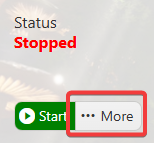
3. Next, click the More button next to the Start/Stop button and click it to access the additional server management options.
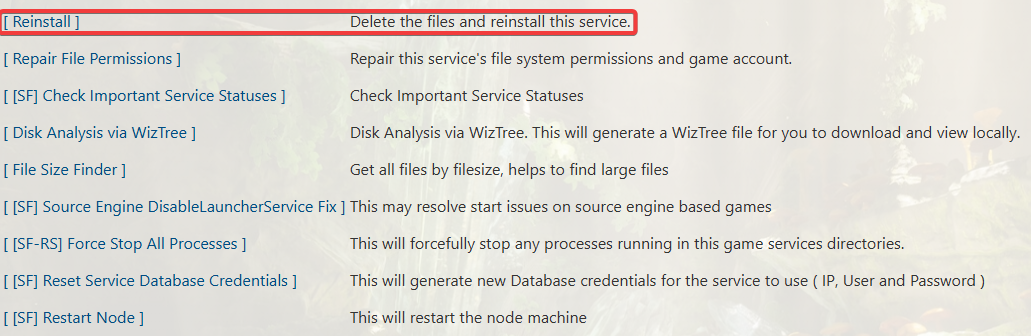
4. Locate and select the Reinstallation option to begin reinstalling your DeadPoly server.
Please note that this process will erase your existing server data, so make sure to create a backup of any important files, saved data, and configuration settings before proceeding.
5. Wait for the reinstallation process to complete before making any further changes to your server.
Once the process has finished, verify that the server is ready to start and reconfigure your settings as needed.
Did the above information not work for you?
Please click here to contact our support via a ticket.