This guide will show you how to edit the Welcome Message on your Necesse Server
Looking for a Necesse game server? Click here to order your server!
First impressions matter, especially on a multiplayer server. When players join your Necesse server, the Message of the Day (MOTD), or welcome message, serves as their primary line of communication. It is the ideal place to greet returning members, showcase server rules, list Discord invite links, announce scheduled maintenance, or inform players of ongoing events. Setting up a clean and informative welcome message helps establish a professional tone for your gaming community while keeping everyone aligned on community expectations. Fortunately, Necesse makes it straightforward for server owners and administrators to customize this message to fit their server's identity and needs. This guide details everything you need to know about setting up and modifying the welcome message on your Necesse server. You will learn how to configure a permanent MOTD through the server configuration files (server.cfg) and how to update it on the fly using in-game administrative commands.
Updating the Message of the Day
1. Log in to your Game Control Panel and navigate to your service.
2. Before making any changes, ensure that your server is fully stopped.
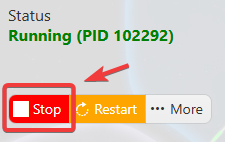
This helps prevent configuration changes from being overwritten or reverted to their default values.
3. Navigate to the Configuration Files tab to access your server’s configuration settings.
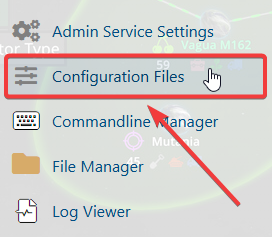
4. In the configuration files, navigate to cfg\server.cfg, then select Config Editor to open the file.

5. Locate the MOTD setting within the file and update it with your preferred welcome message.
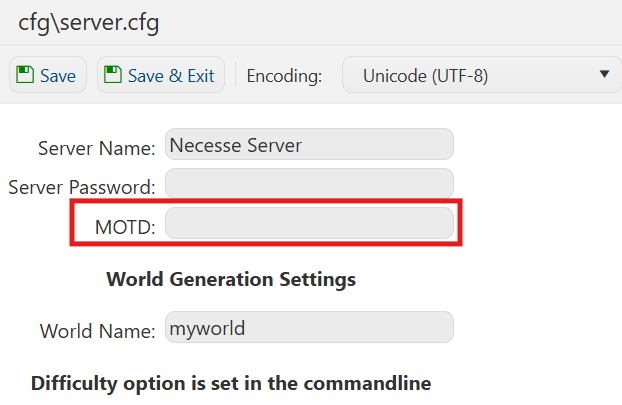
6. Once you have finished editing the settings, click the Save button to apply the changes to your server.

If you prefer to modify the server name directly within the configuration file instead of using the UI, click Text Editor next to Config Editor and make your changes there.
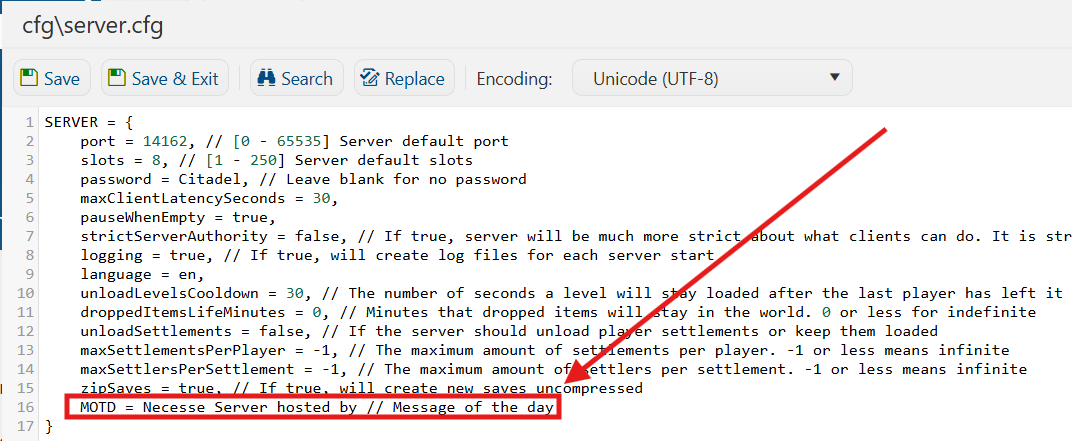
Using the Text Editor allows you to preserve custom configurations, such as installed mods and custom scenarios, without having them overwritten or affected by the preset settings in the Config Editor.