This guide will show you how to Adjust Player Respawn Settings in your Barotrauma Server
Click here to order your Barotrauma server from Citadel Servers today!
Managing player respawns is an important part of running a Barotrauma server, especially when you want to control how quickly players can return to the action after being incapacitated. Depending on your server's settings, respawn options can affect gameplay pace, difficulty, and the overall experience for everyone on the crew. In this guide, we'll show you how to adjust the player respawn settings on your Barotrauma server. Whether you want to reduce respawn delays, increase the challenge, or customize the experience for your players, these settings give you greater control over how respawning works during a campaign.
(Note: Respawn settings can only be configured by server administrators or players who have been granted the appropriate permissions. This helps ensure that authorized users control changes to the server’s respawn behavior and keep it consistent with the intended gameplay experience.)
Changing Respawn Settings
1. To access and modify the respawn settings, first join the server with administrator privileges.
2. Open the Respawn Settings menu to view and configure the available player respawn options.
3. Select the desired Respawn Mode based on how you want player respawns to function on your server.

4. Adjust the available Respawn Settings for the selected mode as needed.
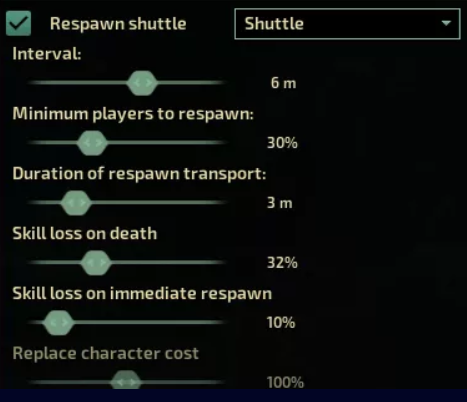
Depending on the chosen mode, certain settings may be available for further customization.
5. To disable standard player respawns, set the Respawn Mode to Permadeath.

With this mode enabled, players will not automatically respawn after death, creating a more challenging and unforgiving gameplay experience.
6. With Permadeath enabled, players can choose between the Bot Takeover and Ironman options.
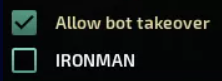
Bot Takeover allows dead players to take control of an available bot, while Ironman limits players to a single life, preventing them from returning after death.
Did the above information not work for you?
Please click here to contact our support via a ticket.