This guide will show you how to spawn and Manage Bots in Barotrauma
Click here to order your Barotrauma server from Citadel Servers today!
Managing a crew in Barotrauma can be challenging when you don’t have enough players to fill every role. Fortunately, bots can step in as AI-controlled crew members, helping operate the submarine, maintain equipment, and perform essential tasks while you focus on surviving the dangers of the deep. In this guide, we’ll cover how to spawn and manage bots in Barotrauma, including the available methods for adding AI crew members to your submarine and controlling their roles. Whether you’re playing alone, hosting a private server, or simply need extra crew members, learning how to manage bots can make your missions much easier and more efficient.
Setting Up Custom Ranks on Your Barotrauma Server
1. Join the server with administrator privileges. If you need assistance with this process, please refer to our guide here.
2. Under Gamemode Settings, locate the Bot Settings section.
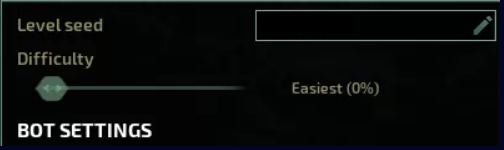
3. Adjust the Bot Count setting to the desired number of bots.
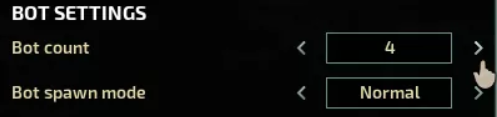
4. Select the desired Bot Spawn Mode. When set to Fill, the server will automatically add bots until the number of players exceeds the configured Bot Count.

5. Click the Start button to launch the server with your configured bot settings.
Did the above information not work for you?
Please click here to contact our support via a ticket.