
How to Host a Subnautica 2 Server – Step-by-Step Guide for Explorers
If you want complete control over your Subnautica 2 experience, hosting your own dedicated server is the perfect way to do it. Whether you’re exploring alien oceans with friends, building underwater bases, or customizing survival settings, a dedicated server gives you full control over your adventure.
This guide explains how to host your own Subnautica 2 server and why Citadel Servers is an excellent choice for reliable game hosting.
Step 1: Pick a Reliable Hosting Provider
Subnautica 2 is an immersive survival game that benefits from powerful hardware and stable networking, especially during multiplayer exploration and large base-building sessions.
When choosing a hosting provider, consider the following:
Performance: Fast CPUs and NVMe SSD storage help ensure smooth gameplay and quick world loading.
Network Stability: Reliable low-latency connections improve synchronization and reduce lag while exploring underwater environments.
Easy Server Management: A simple control panel makes server setup, configuration, and maintenance easy for all players.
Support Availability: 24/7 technical support ensures assistance is always available if issues occur.
Citadel Servers provides all of these features, delivering optimized hardware and dependable infrastructure designed specifically for multiplayer survival games.
Step 2: Order Your Hosting Plan
Once you’ve decided to host with Citadel Servers, getting started is simple:
1. Go to the Subnautica 2 hosting page.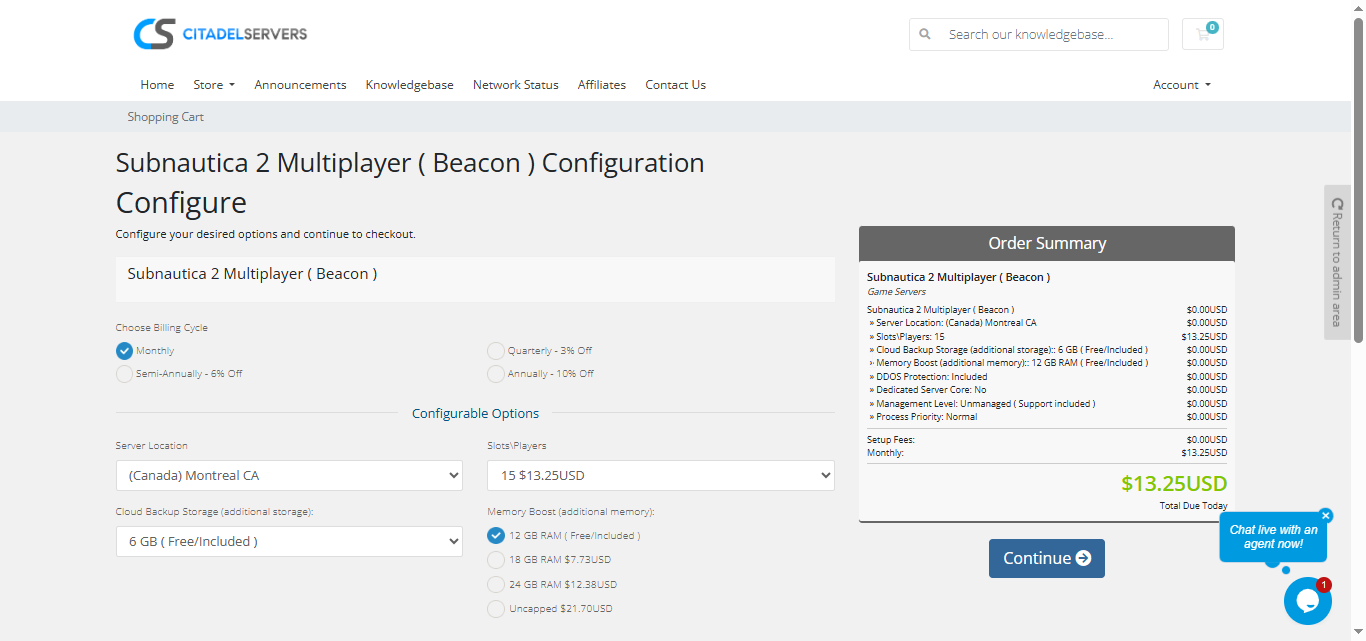
2. Choose how many player slots you want.
3. Pick your server location closest to your player base for the best ping.
4. Select any extras, like process priority, premium support, etc.
5. Proceed to checkout, once payment is confirmed, your server deploys automatically.
You’ll receive an email with your control panel login details and connection info within minutes.
Step 3: Configure Your Server
After deployment, it’s time to personalize your world:
Login to your Game Panel
Set your server name, password, and administrator permissions.
Adjust gameplay settings such as survival difficulty, resource availability, creature behavior, and player limits.
Configure world progression and customization options to match your preferred playstyle.
Upload mods or custom files through FTP/SFTP if supported by your server version.
Step 4: Launch and Play
After configuration is complete, start your server from the control panel and invite your friends to join.
Players can connect using the in-game server browser or by entering your server’s IP address and port manually.
You’ll also be able to:
- Monitor player activity
- Restart or update your server
- Manage admins and permissions
- Schedule maintenance or backups
Everything is managed from one convenient web interface.
Why Host with Citadel Servers
Hosting your Subnautica 2 server with Citadel Servers gives you the performance, flexibility, and reliability needed for smooth multiplayer exploration and survival gameplay. Whether you’re running a small private world or a large public community, our infrastructure is built to handle demanding underwater adventures.
What Makes Us Stand Out
Instant Setup: Your server deploys automatically immediately after payment, allowing you to begin exploring within minutes.
High-Performance Hardware: All servers run on dedicated CPU resources and ultra-fast NVMe SSD storage for smooth gameplay and minimal lag.
Global Data Centers: Choose from multiple worldwide locations to ensure the best connection for you and your players.
Full Access & Mod Freedom: Enjoy complete file access, upload, edit, and customize every part of your game world.
One-Click Mod Manager: Our built-in modding system lets you browse, install, update, and manage mods instantly without touching complicated tools.
Automated Backups & Easy Restarts: Protect your progress with regular backups and manage reboots directly from your control panel.
24/7 Expert Support: No matter your time zone, our technical team is always available to help you resolve issues quickly and get you back in the game.
Your underwater world deserves a strong, stable foundation and that’s exactly what Citadel Servers delivers: performance, control, and reliability designed for serious explorers.
Order your Subnautica 2 Server now

```