

This guide will help you learn how to Turn Off Fall Damage in Hytale Servers.
Click here to order your Hytale server with Citadel Servers today!
Fall damage is a core mechanic in Hytale that adds realism and challenge to gameplay. However, when running a server, especially one focused on creative building, mini-games, or casual play, you may want to disable it to give players more freedom and reduce frustration. Turning off fall damage ensures that players can explore, build, and experiment without worrying about accidental deaths or health loss from high drops. In this guide, we’ll walk through the steps to disable fall damage on your Hytale server. Whether you’re setting up a safe environment for new players or designing a custom game mode, this simple adjustment can make your server more enjoyable and accessible. By the end, you’ll know exactly how to configure your world so players can roam freely without the risk of falling harm.
Disable Fall Damage in Hytale Servers
1. Log in to your Game Control Panel and navigate to your service.
2. Before making any modifications, stop the server from running by clicking the Stop button.

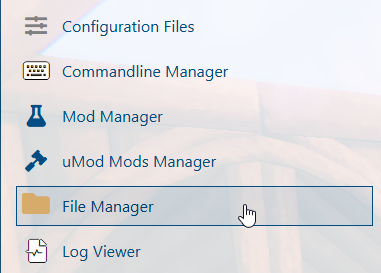
3. Navigate to the File Manager Tab.
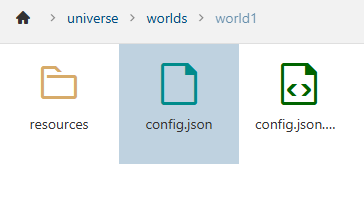
4. Follow this directory path: /home/universe/worlds/(chosen world)/config.json and double-click it.
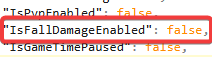
In the file, look for the IsFallDamageEnabled line and change the value to False.
5. After editing, click the Save button to apply the changes to your server.

Did the above information not work for you?
Please click here to contact our support via a ticket.