

This guide will help you learn how to set or change the World Seed on a Hytale Server.
Click here to order your Hytale server with Citadel Servers today!
In Hytale, the world seed is the foundation of your server’s landscape. It determines how terrain, biomes, structures, and resources are generated, making each seed a unique blueprint for adventure. By setting or changing the world seed, you gain control over the type of environment your players will explore, whether you want sprawling mountains, dense forests, or rare structures close to spawn. Customizing the seed allows server owners to create tailored experiences, from survival challenges with harsh terrain to creative worlds designed for building and exploration. It’s a powerful way to shape the atmosphere and gameplay style of your server. In this guide, we’ll walk through the steps to set or change the world seed on a Hytale server, explain how seeds influence world generation, and share tips for choosing the right seed to match your community’s vision.
Customizing Your Hytale Server: Adjusting the World Seed
1. Log in to your Game Control Panel and navigate to your service.
2. Before making any modifications, stop the server from running by clicking the Stop button.

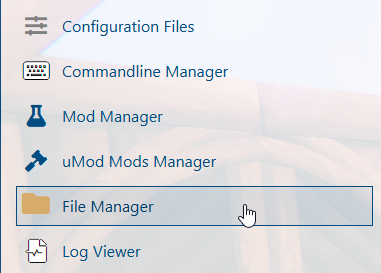
3. Navigate to the File Manager Tab.
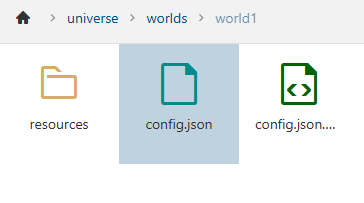
4. Follow this directory: /home/universe/worlds/(chosen worlds)/config.json.
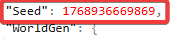
Set the Seed value to the world seed that matches the type of world you’d like to generate.
5. After editing, click the Save button to apply the changes to the server.

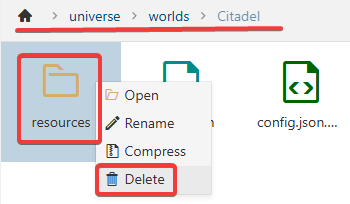
6. Select the chunks and resources folders, if they are available, and delete them.
Did the above information not work for you?
Please click here to contact our support via a ticket.