
This guide will help you learn how to Adjust View Distance on a Hytale Server.
Click here to order your Hytale server with Citadel Servers today!
The view distance setting in a Hytale server determines how far players can see into the world around them. This directly affects both the gameplay experience and server performance. A higher view distance allows players to enjoy sweeping landscapes and spot structures from afar, but it can also demand more resources from the server and connected clients. On the other hand, lowering the view distance can improve performance and stability, especially for larger servers or those running on limited hardware. By adjusting the maximum view distance, you can strike the right balance between visual immersion and smooth gameplay. Whether you’re hosting a small private server or managing a large community, customizing this setting ensures that your world runs efficiently while still looking great. In this guide, we’ll walk through the steps to change the max view distance on a Hytale server, explain how it impacts performance, and share tips for choosing the best values for your setup.
Customizing Max View Distance in Hytale Server
1. Log in to your Game Control Panel and navigate to your service.
2. Before making any modifications, stop the server from running by clicking the Stop button.

3. Navigate to the Configuration Files Tab.
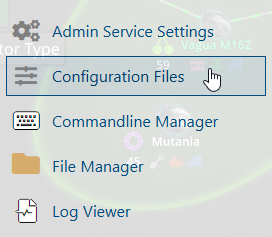
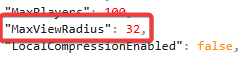
4. In the Configuration Files, look for the config.json file and look for the MaxViewRadius line.

Customize the value of MaxViewRadius to your preferences.
5. After editing, click the Save button to apply the changes to your server.

Did the above information not work for you?
Please click here to contact our support via a ticket.